Your TTRPG sessions on Discord, VoLog takes the notes.
Run /volog start and just play: VoLog captures the game, respects consent, and produces a faithful note without off-game/meta.
Why it’s different
Zero effort for players, no server clutter.
Immediate transparency
Public message required, individual opt-in/opt-out, verifiable with /volog status.
Game-focused notes
Off-game and meta filtered out: you get a faithful game note, not raw recordings.
Zero friction
One command to start, one to stop. No spam, no complex setup.
How it works in 4 steps
Built for players who just want to play.
1 · Step
Invite the bot to the server (permissions are pre-configured in the link).
2 · Step
Run /volog start from the voice channel.
3 · Step
The public message appears, everyone picks whether they’re recorded.
4 · Step
Stop with /volog stop: the session shows up in VoLog with a faithful game note.
Respectful for players and the server
Visible consent, controlled capture, stop as soon as needed.
- No session starts without a public message.
- Opt-out immediately stops capture for that person.
- You can stay in voice without being recorded.
- No access to text messages; only voice and posting the session message.
- No audio files stored in VoLog: only metadata and the note produced from voice.
Install the bot
For Discord admins: add it with minimal permissions.
1 · Step
Invite the bot via the authorization link.
2 · Step
Pick the server and allow voice + session message posting.
3 · Step
Test in a dedicated voice channel before a real game.
Connect Discord to VoLog
Link your account to see sessions inside the workspace.
1 · Step
Click “Connect Discord” and finish OAuth.
2 · Step
You land back in VoLog, “Audio sessions” tab.
3 · Step
Start your next game: /volog start, then /volog stop.
What VoLog gives you back
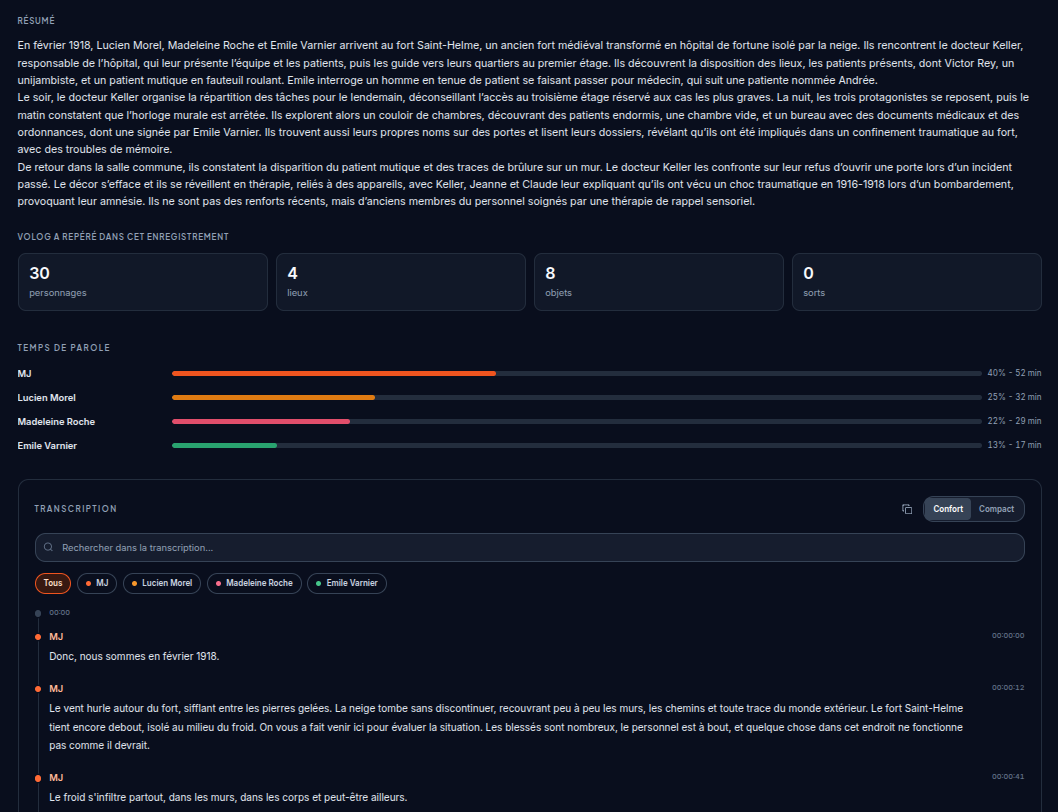
A faithful game note with zero effort on your side.
FAQ
Security, consent, and retrieving notes.
/volog status displays the state.
Try it on your next Discord voice.
Invite the bot, connect Discord to VoLog, and let VoLog keep the notes.